
Booking Sessions System Case Study




This project is an end-to-end coaching platform designed to streamline session management for coaches and simplify the booking experience for users.
It consists of a web-based system where coaches can manage their sessions, define their availability, and organize their schedules.
Alongside that, a mobile app was designed to help users explore available coaches, select the right session, and book a time that fits their needs.
The goal of the product was to create a seamless connection between coaches and users through a scheduling experience that feels clear, efficient, and easy to trust.


Project Duration
2 Months




#2CBCAF
+70 Web Screens
+60 App Screens
Galsa
Problem It Solves
Coaching sessions were often managed through fragmented and manual processes, making the experience inefficient for both coaches and users. Coaches needed a better way to manage their schedules, control their availability, and organize session bookings without unnecessary complexity.
At the same time, users lacked a simple and clear way to find the right coach, understand the available sessions, and book a suitable time based on their own schedule. This often led to friction in the booking journey and made the overall experience feel less convenient than it should be.
Since the sessions were conducted online, attendance also depended heavily on timely communication and reminders. Without a reliable system in place, missed sessions and scheduling confusion could easily happen.
This system was created to solve these challenges by providing a smoother, more structured experience that supports both efficient session management for coaches and effortless booking for users.


identify how coaches currently manage their sessions, schedules, and availability
understand the difficulties users face when searching for coaches and booking sessions
explore the main friction points in online session scheduling and attendance
discover what builds trust and clarity for both sides during the booking process
understand the role of reminders and notifications in reducing missed sessions
define the key user needs that the platform should solve for both coaches and users
Research Objectives
Qualitative Research:
For Coaches:
How do you currently manage your coaching sessions and appointments?
What challenges do you face when organizing your schedule?
How do you define and update your available time slots?
What usually causes confusion or mistakes in the booking process?
How do you communicate session details with users?
What problems do you face with online session attendance?
How do missed sessions or late users affect your workflow?
What would make session management easier for you?
What information do you need to see clearly before confirming a booking?
How do you prefer to manage your daily or weekly schedule?


For Users:
How do you usually search for a coach or service provider?
What helps you decide which coach is right for you?
What information do you expect to see before booking a session?
What difficulties do you usually face while booking an appointment?
How do you choose a time that fits your schedule?
Have you ever missed an online session? What was the reason?
How important are reminders before a booked session?
What makes the booking experience feel easy and trustworthy?
What would make you more confident while booking an online session?
What frustrates you most in similar booking experiences?


Design Methodology
Design Thinking Process
Empathize


Quantitative Research:
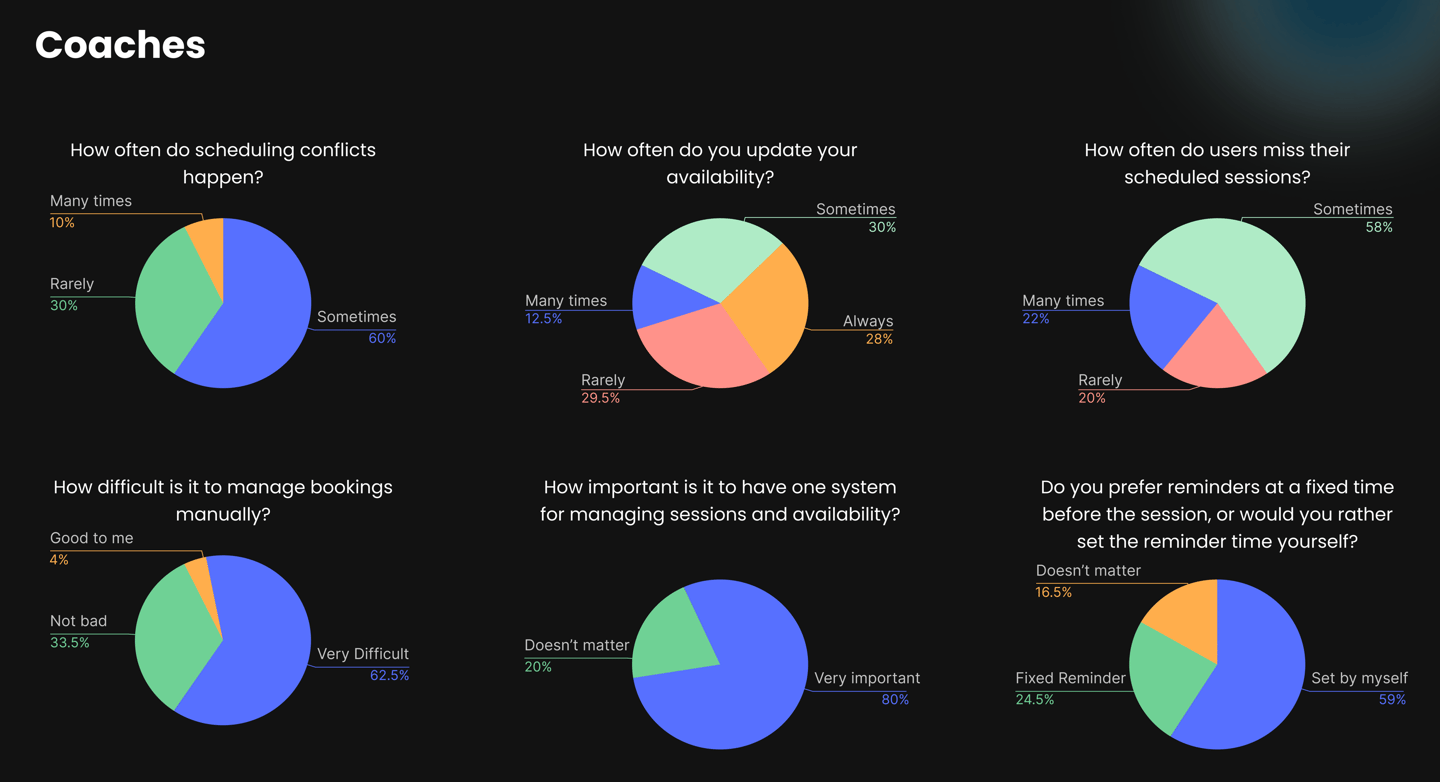
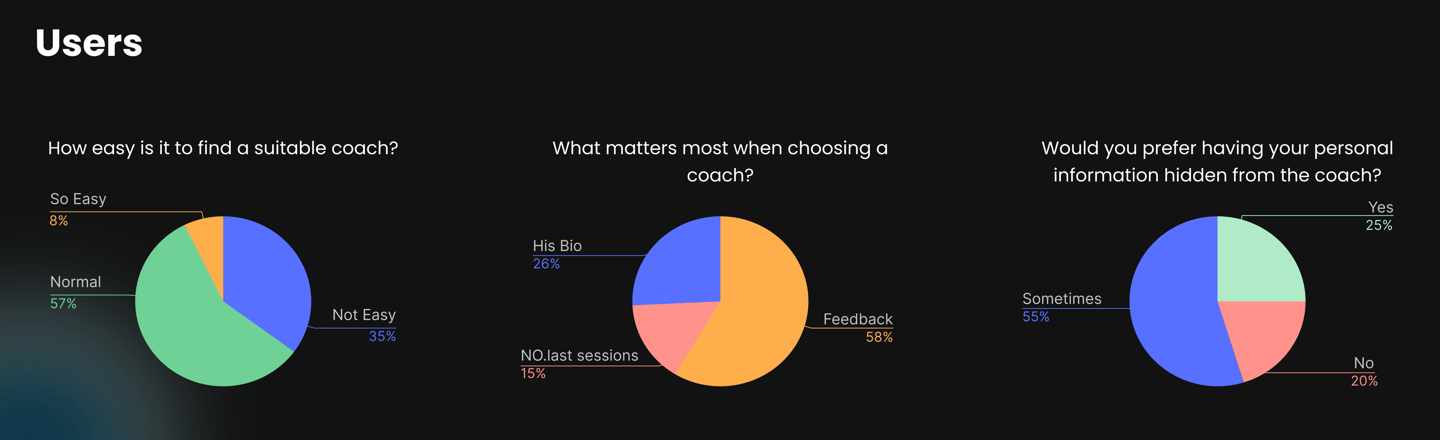
From the past intro we got 3 different personas


Personal Details
Name: Hader Ali
Age: 38
Role: Life Coach
Experience: 7 years
Goals
Manage her sessions in a more organized way
Set and update her availability easily
Reduce missed sessions and last-minute confusion
Have a clear overview of her bookings
Pain Points
Managing bookings manually takes too much time
Difficulty keeping availability updated across appointments
Missed sessions affect her productivity
Lack of a clear system creates scheduling confusion
Needs
A simple dashboard to manage sessions and availability
Clear booking details for each appointment
A system that reduces manual effort
Better communication and reminders for users
Behavior
Works with multiple clients every week
Adjusts her availability based on her daily schedule
Conducts sessions online
Needs a reliable way to track confirmed appointments
Personal Details
Name: Omar Mohamed
Age: 29
Role: Senior Tech
Experience: 5 years
Goals
Find the right coach quickly
Understand available sessions clearly
Book a time that matches his schedule
Get reminders so he does not miss the session
Pain Points
Difficulty choosing the right coach
Confusion when available slots are unclear
Booking flows can feel long or complicated
Sometimes forgets session times without reminders
Needs
Clear coach profiles and session information
A simple and smooth booking flow
Easy access to available dates and times
Timely reminders before the session starts
Behavior
Compares more than one coach before booking
Prefers online sessions because they are more flexible
Books based on availability and convenience
Relies on reminders for important appointments
“I need a simple way to manage my schedule without spending too much time on coordination.”


“I want booking a coaching session to feel quick, clear, and stress-free.”
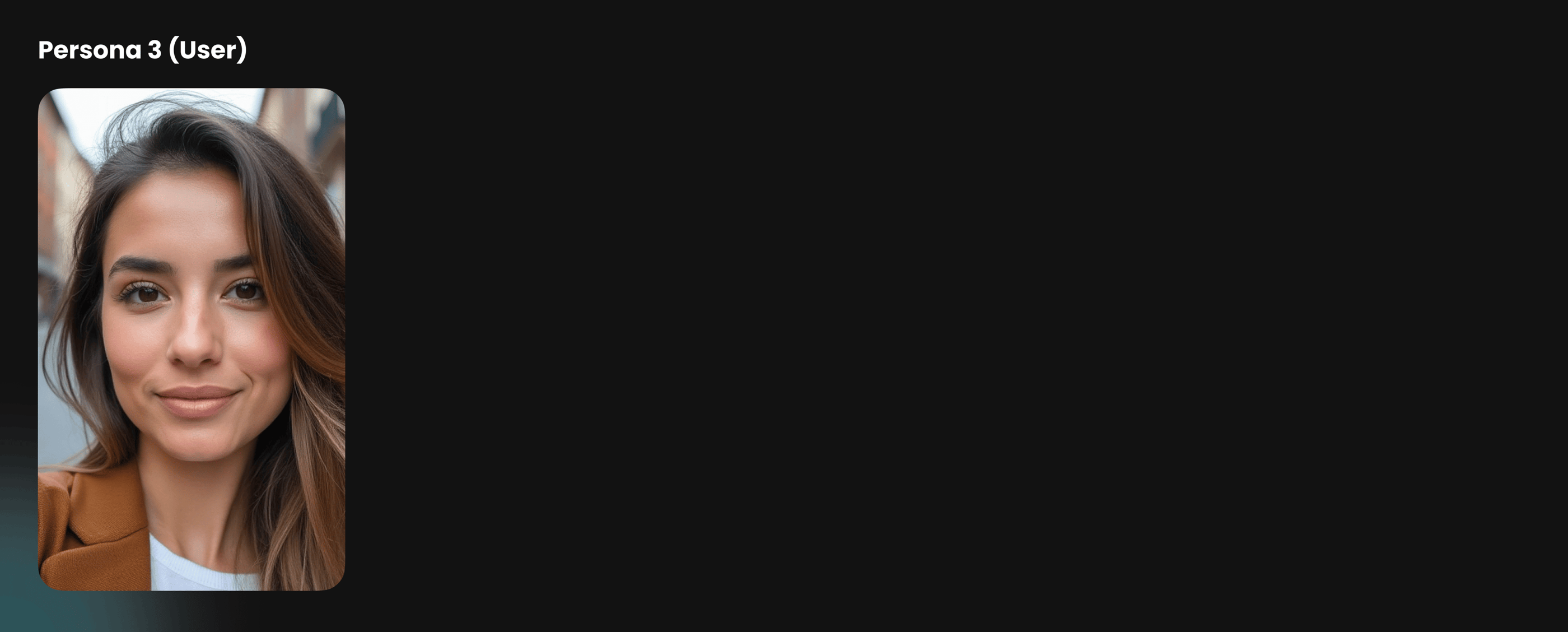

Personal Details
Name: Lina
Age: 30
Goals
Book coaching sessions in a safe and comfortable way
Maintain a sense of privacy while using the platform
Choose when and how much personal information to share
Access private sessions when discussing sensitive topics
Pain Points
Feeling uncomfortable sharing too much personal information too early
Worrying that privacy may not be fully respected during the process
Hesitating to book sensitive sessions without enough reassurance
Needing a more private experience for certain topics
Needs
The option to book private sessions
A booking experience that feels secure and respectful
Clear privacy settings and confidentiality cues
Control over what information is visible to the coach
Behavior
Prefers online sessions for more comfort and flexibility
Tends to be more cautious before booking a coach
Looks for clear signs of trust, confidentiality, and professionalism
May avoid booking if the experience feels too exposed or intrusive
“Sometimes I need a private session and also want to keep my privacy from the coach until I feel comfortable.”


What we got
How might we design a coaching platform that helps coaches manage their sessions efficiently while allowing users to discover, book, and attend online sessions easily, with clear scheduling, timely reminders, and privacy-focused options?
Framing this as a user story
As a coach, I want to manage my sessions, availability, and bookings in one place, so that I can organize my schedule more efficiently.
As a user, I want to easily find the right coach and book a suitable session time, so that the experience feels simple, clear, and convenient.
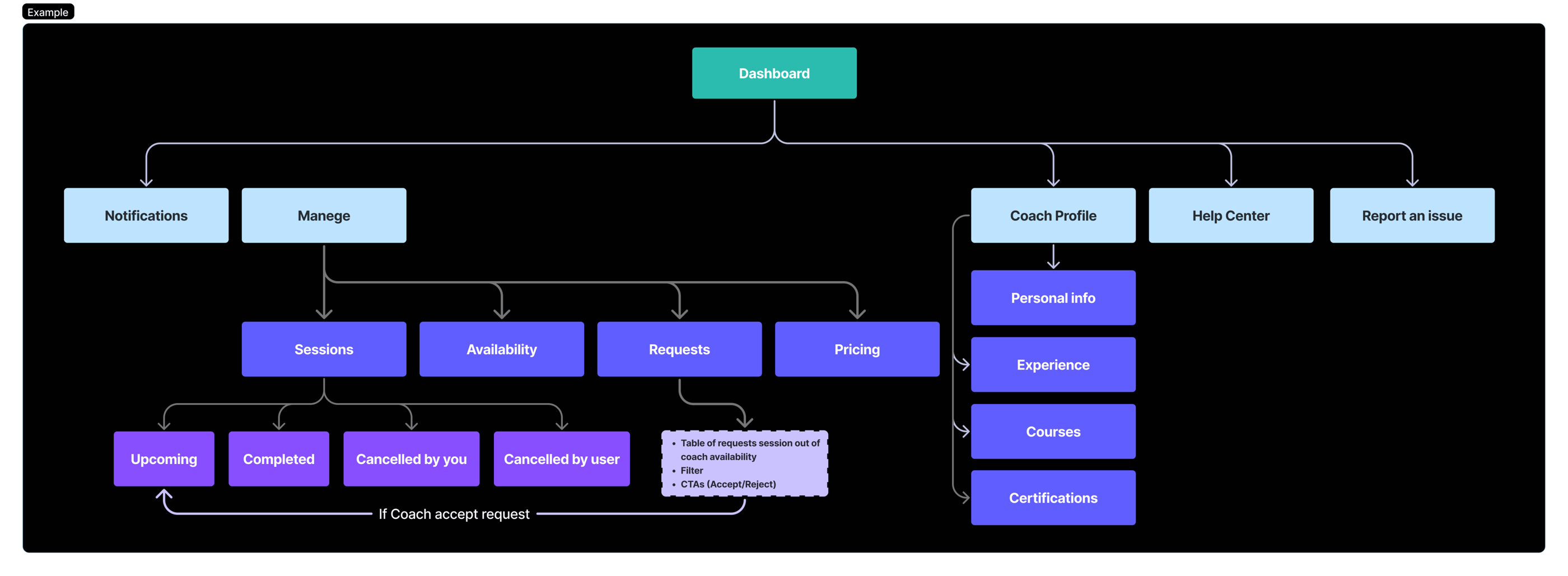
Ideate
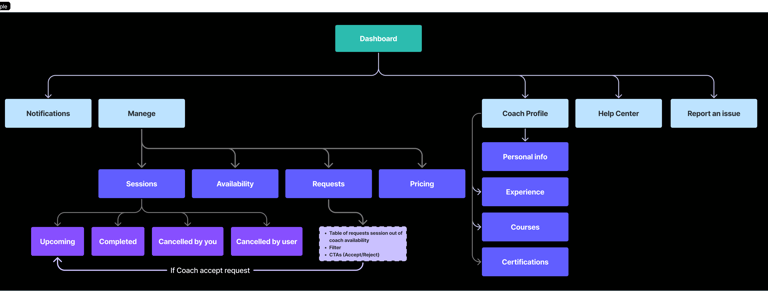
Information Architecture Diagram for Coach Dashboard
Define Phase
Prototype
After sketching on paper, I start building high fidelity screens
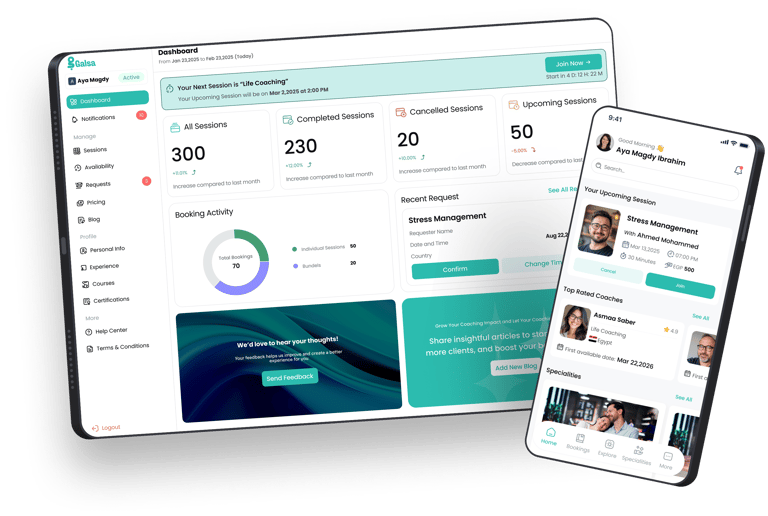
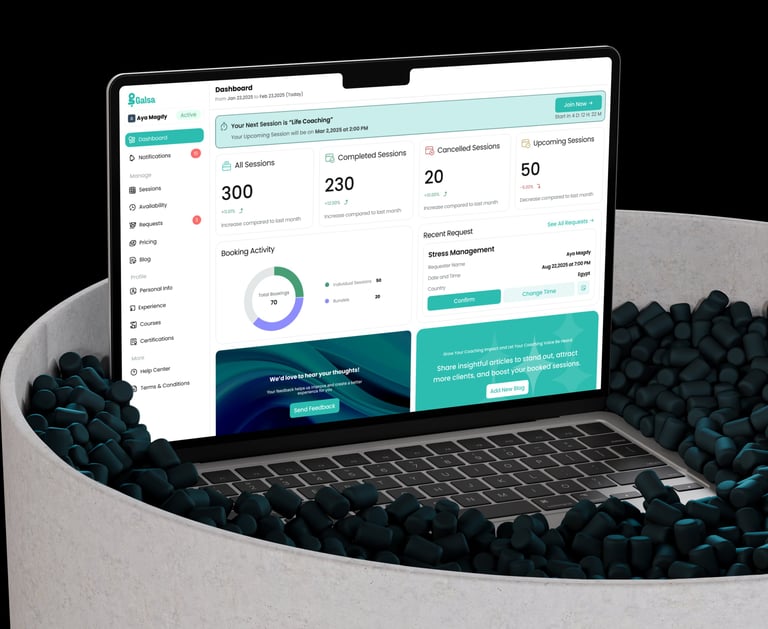
Coach Dashboard
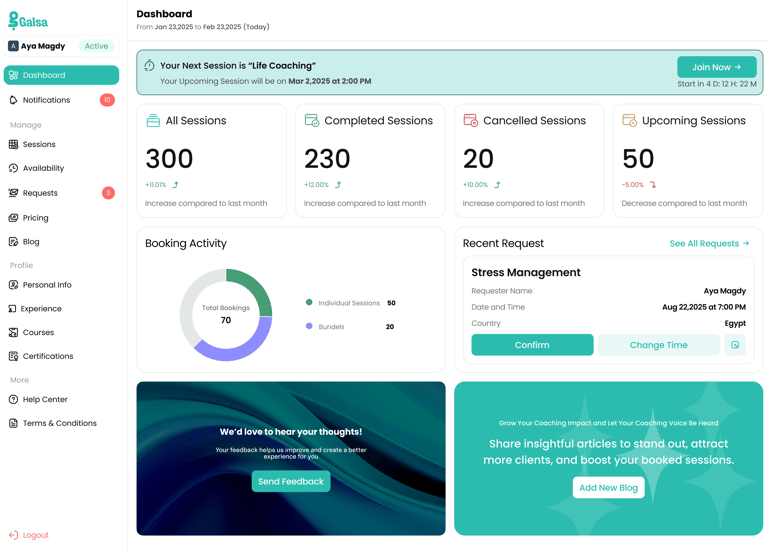
The dashboard was designed to give coaches a clear, quick overview of their sessions and daily activity, while enabling them to take immediate actions without friction.
Visual Hierarchy & Clarity
The layout prioritizes the most important information at the top, starting with the upcoming session. This helps coaches quickly understand what’s next without searching through the interface. Key metrics such as total sessions, completed, cancelled, and upcoming sessions are displayed in clear cards, making performance easy to scan at a glance.
Action-Oriented Design
The UI focuses on enabling quick actions. For example, the “Join Now” button for upcoming sessions and “Confirm / Change Time” actions in requests are clearly visible and easy to access. This reduces the time needed to manage bookings and improves workflow efficiency.
Sessions Management
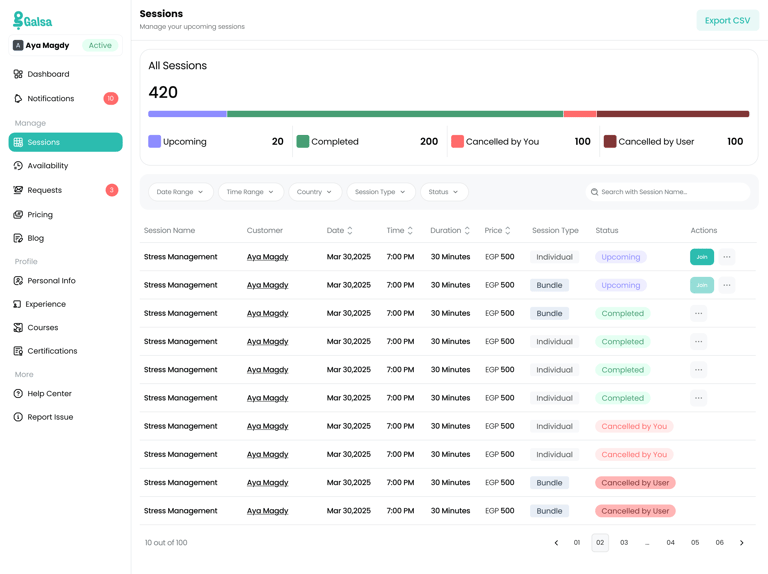
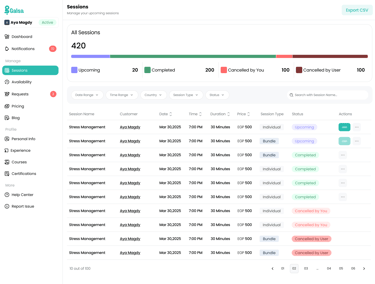
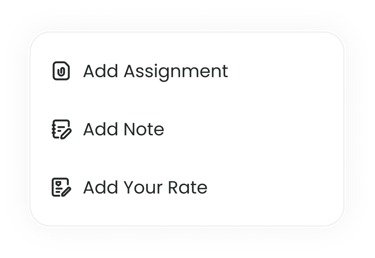
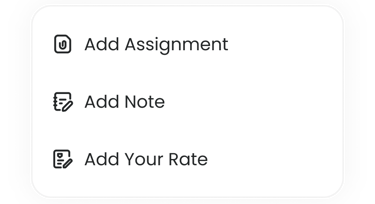
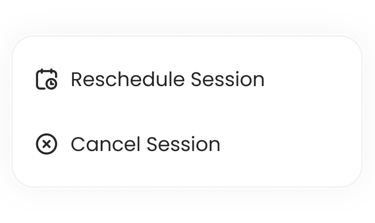
This screen was designed to give coaches full control and visibility over all their sessions in one place, making it easier to track, manage, and take actions quickly.
Overview & Data Clarity
At the top, a clear summary of all sessions is presented, including upcoming, completed, and cancelled sessions. The use of a segmented progress bar helps visualize distribution at a glance without needing to read detailed numbers.
Advanced Filtering & Search
To handle large amounts of data, filtering options such as date, time, country, session type, and status were introduced. This allows coaches to quickly narrow down sessions and find specific bookings easily.
Structured Table Layout
Sessions are displayed in a clean table format with essential information like session name, customer, date, time, duration, price, and status. This structured layout helps coaches scan information quickly and reduces cognitive load.
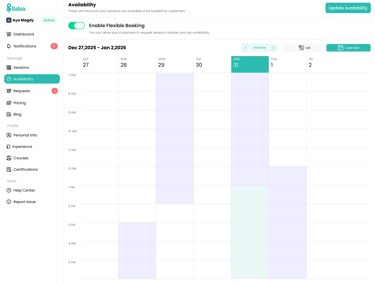
Availability Management
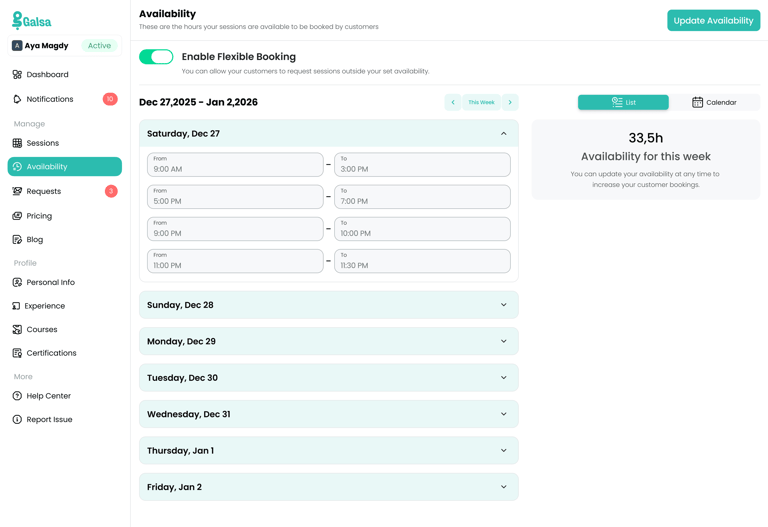
Accordion Layout
Used to organize availability by day, reducing clutter and making it easier to focus on one schedule at a time.
Flexible Time Slots
Allowed coaches to add multiple time ranges per day, giving them full control over how they structure their availability.
Flexible Booking Toggle
Introduced to give coaches the option to accept sessions outside their set schedule, increasing booking opportunities.
Weekly Overview
Added a summary of total available hours to help coaches quickly understand and balance their workload.
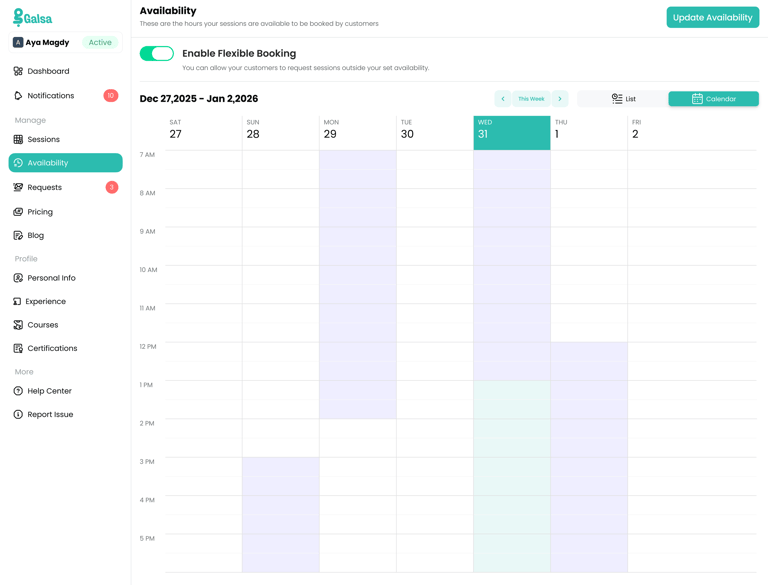
Easy Navigation
Week switching and view options (List / Calendar) make managing availability faster and more intuitive.
Clear CTA
A visible “Update Availability” action encourages regular updates and keeps schedules accurate.
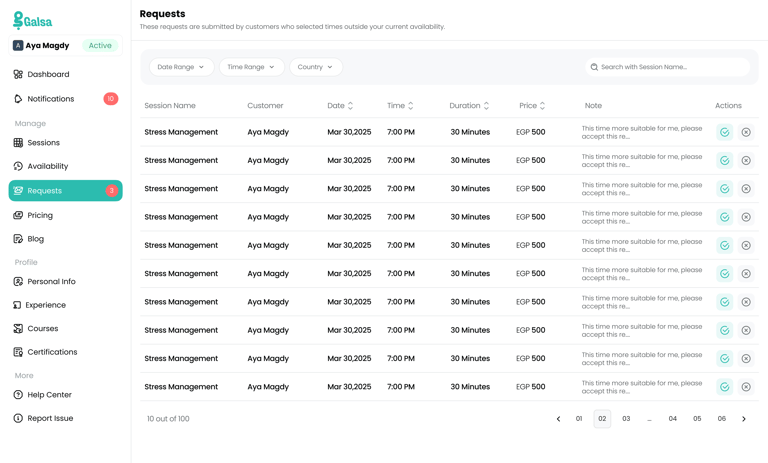
Requests Management
Centralized Requests View
Collected all user requests in one place to give coaches full visibility into sessions that are outside their availability.
Structured Table Layout
Used a table to display key details (user, time, note) clearly, making it easy to scan and review requests quickly.
Quick Decision Actions
Added inline accept/reject actions to allow coaches to respond instantly without extra steps.
User Notes Visibility
Displayed user notes directly in the table to provide context and help coaches make better decisions.
Moving to User App
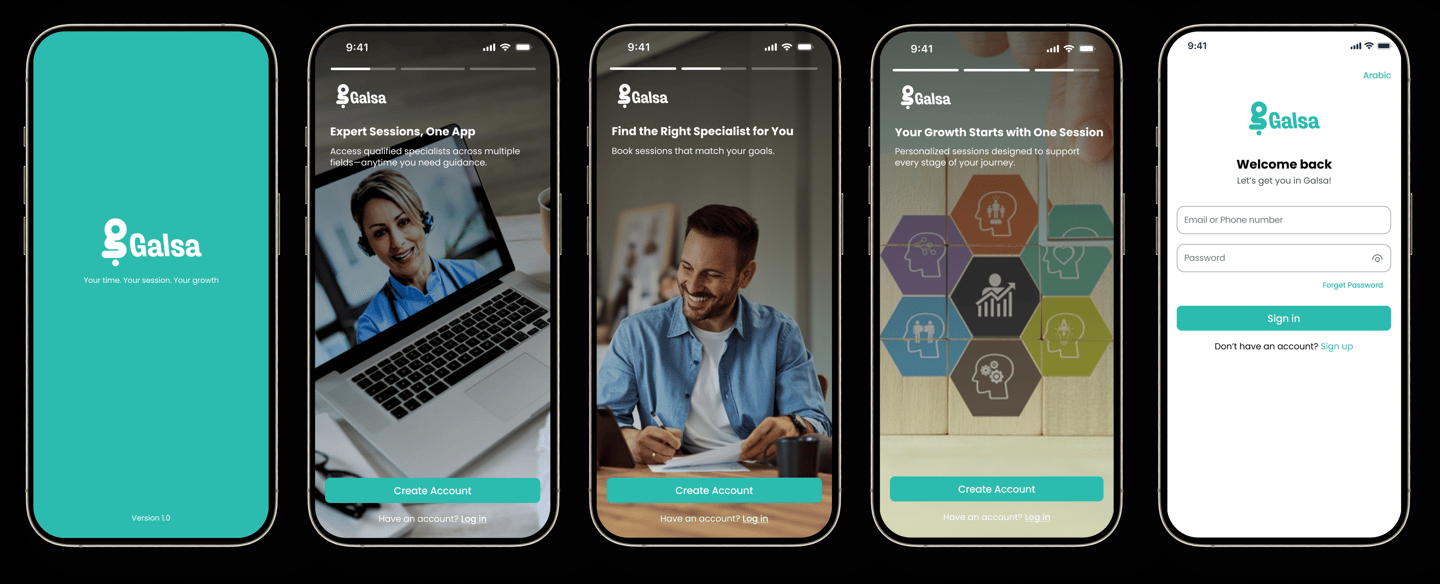
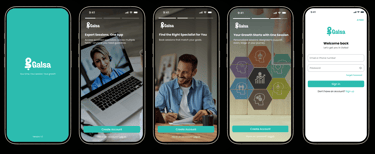
1- Onboarding Screens/Sign in Screen
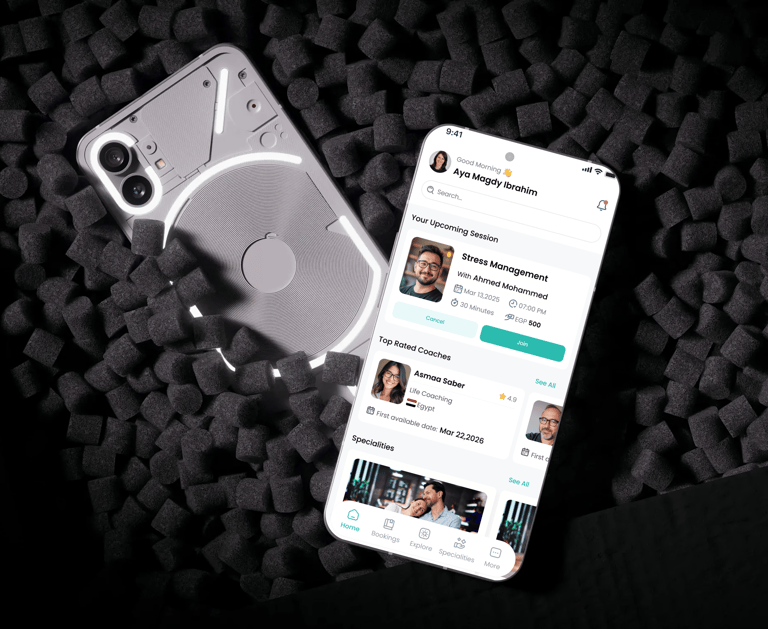
2- Home Screen
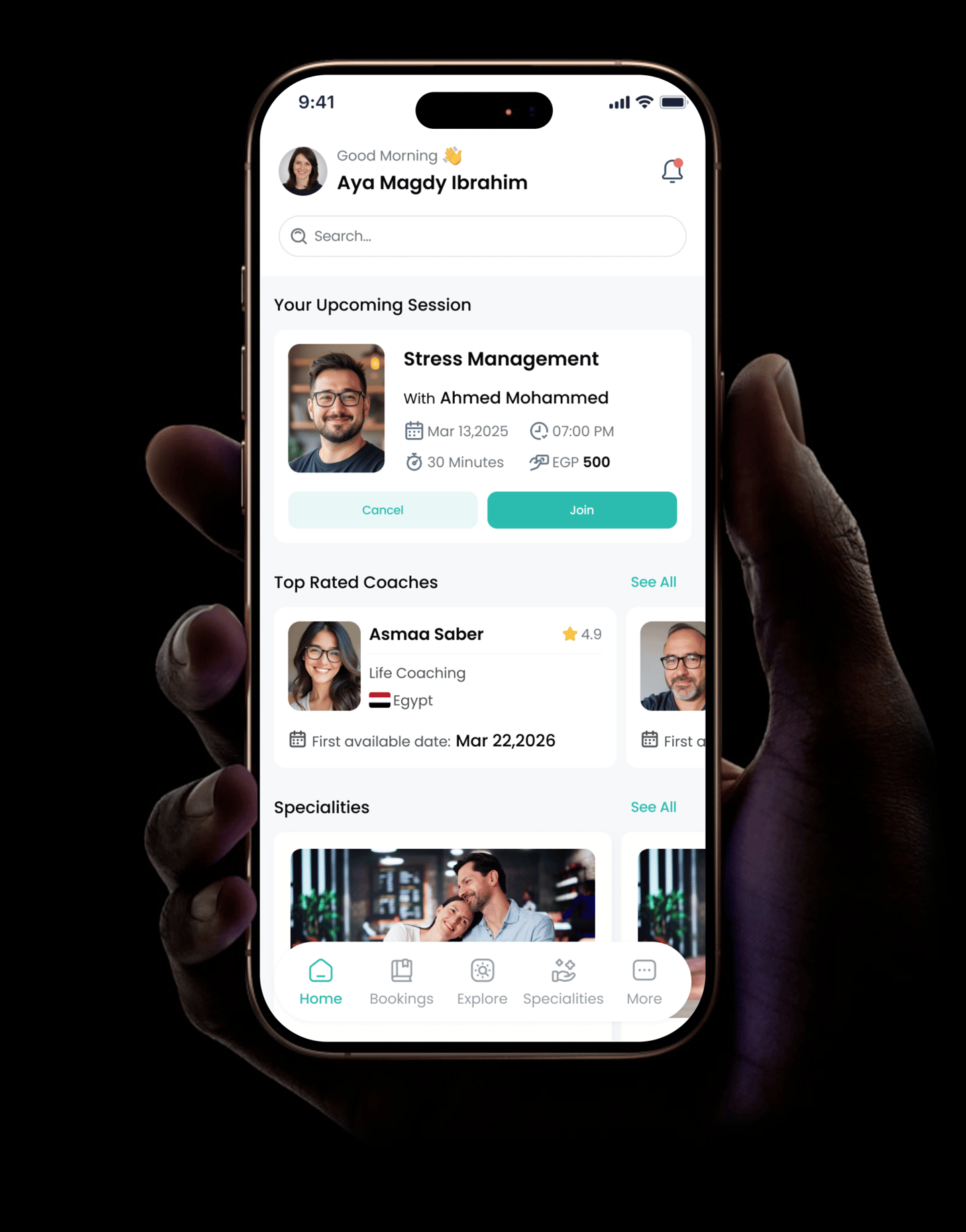
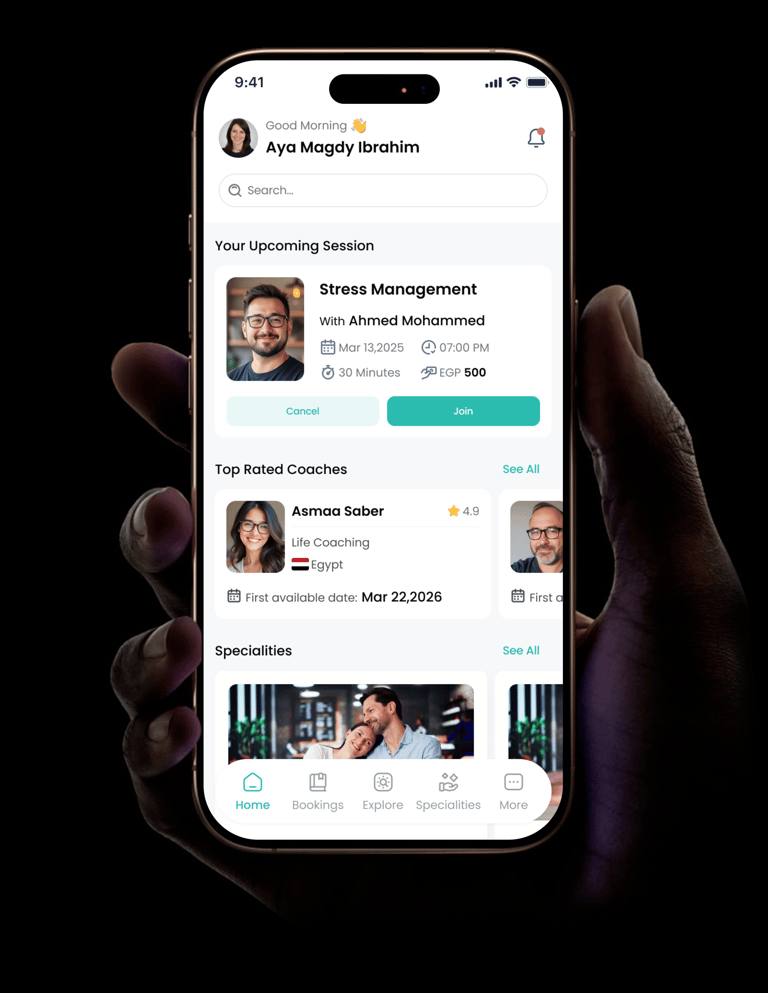
Personalized Welcome
Added a greeting with the user’s name to create a friendly and engaging first impression.
Upcoming Session Priority
Placed the upcoming session at the top to keep users focused on what matters most next.
Clear Session Card
Designed the session card with all key details (coach, date, time, price) in one place for quick understanding.
Quick Actions
Added “Join” and “Cancel” buttons directly in the card to enable fast decisions without extra steps.
Coach Discovery
Highlighted top-rated coaches to help users explore and choose.
Search & Exploration
Included a search bar and categorized sections (coaches, specialties) to make browsing intuitive.
Bottom Navigation
Used a simple bottom nav to give easy access to main sections and support smooth navigation.
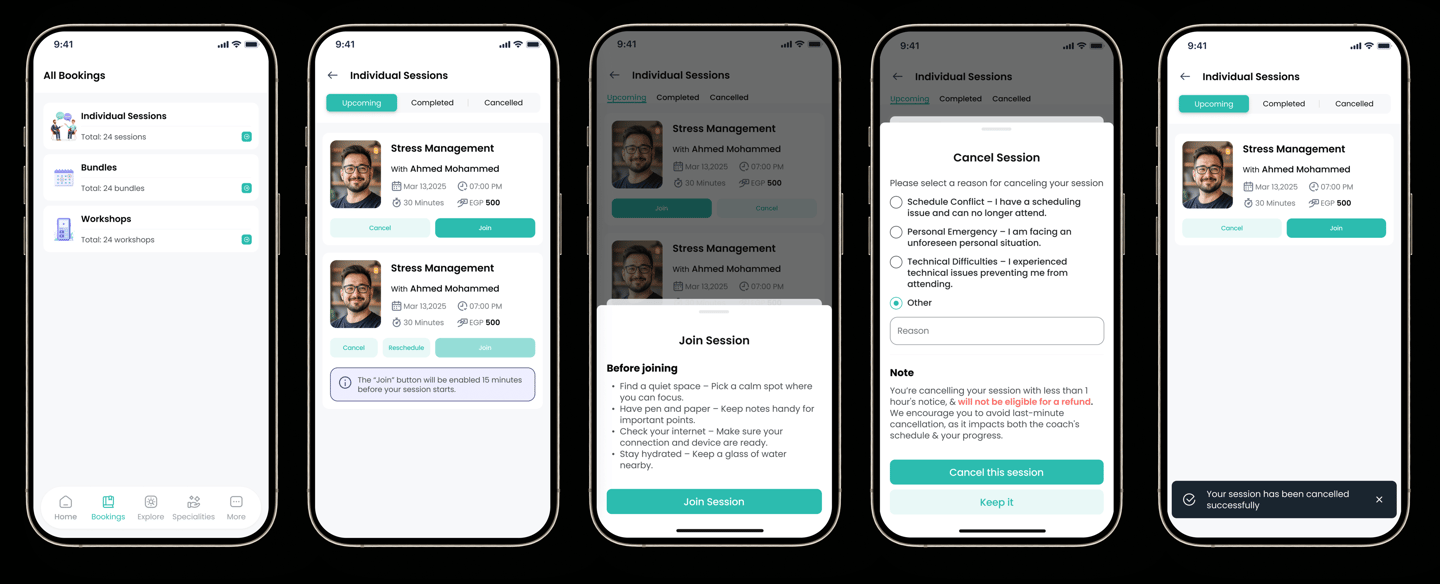
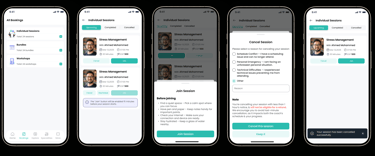
3-User Bookings / Where he could review,cancel or join his sessions
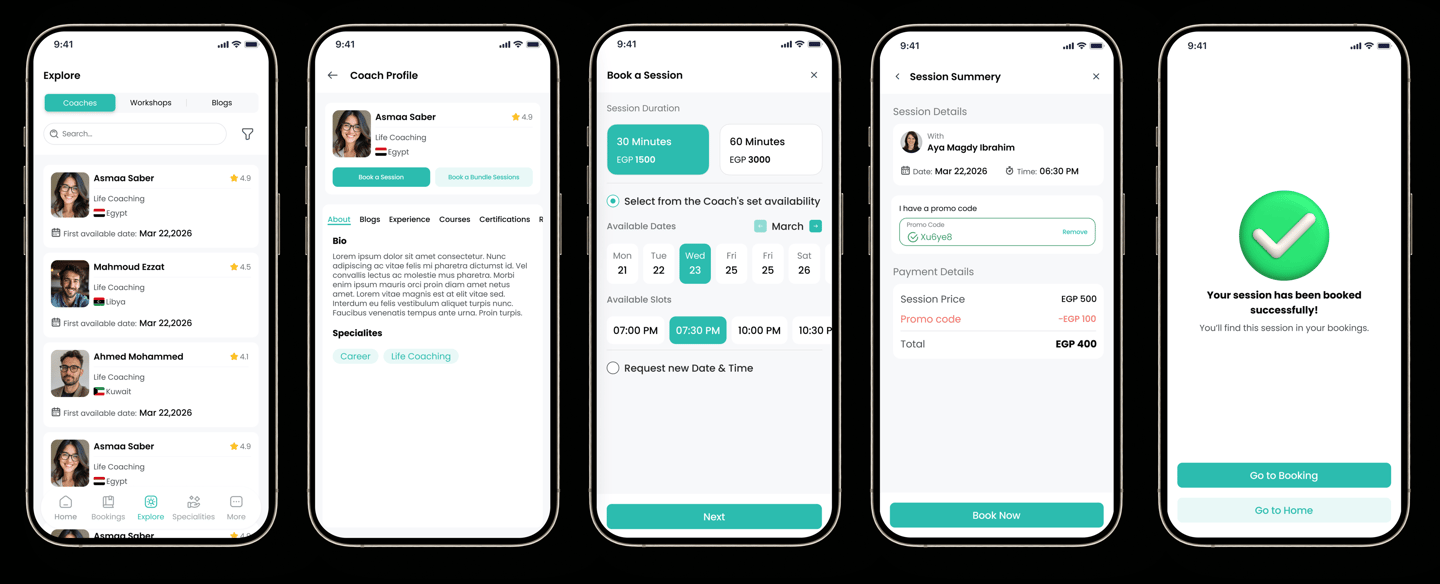
4-Exploring Coaches,Reviewing Coach Profile and Booking session
At the End
This project was about more than just building a booking system — it was about creating a seamless experience that connects coaches and users in a simple and reliable way.
By focusing on both sides of the journey, the product was able to simplify session management for coaches while making the booking experience clear and effortless for users. Key decisions around structure, clarity, and flexibility helped reduce friction, improve efficiency, and build trust in the overall experience.
Throughout the process, the biggest learning was the importance of balancing two different user needs within one system, while keeping the experience intuitive and easy to use.


Have a project in mind?
I'm always interested in hearing about new projects and opportunities.